How To Share HR Policy
Steps to Upload the HR Policy and Add Its URL to the Workspace
Upload the HR Policy:
Navigate to the Company Doctype in your system. Attach the HR Policy document in the "Attachment" section. Set the attachment as Public to generate a URL. Generate and Use the URL:
Once the URL is generated, you can add it to the workspace where all relevant users, such as HRMS personnel, have access.
Steps to Add the URL to the Workspace:
Step 1: Open the desired workspace (e.g., HRMS).
Scroll down and click on Edit.
Step 2: Click on the Add button.
Step 3: A box will appear. Click inside the box.
Step 4:From the dropdown menu, select Shortcut.

Step 5: A popup will appear. Fill in the details as shown in the example.
Note: In the URL field, paste the HR Policy URL.
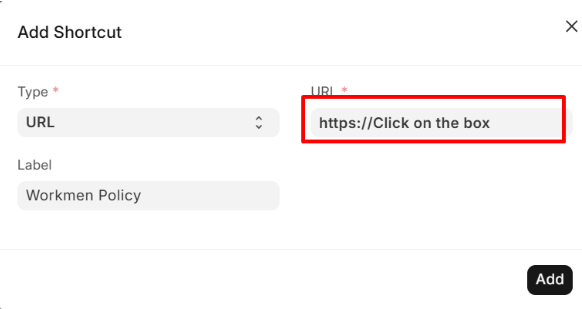
Step 6: Click on Add to save the shortcut.
Step 7: Finally, click on Save to update the workspace.
